Now booking new clients Lake Charles · Lafayette, LA · (337) 305-3703
Turnaround wallchartIndustrial inspections

A digital wallchart for ReCon Management's plant turnarounds

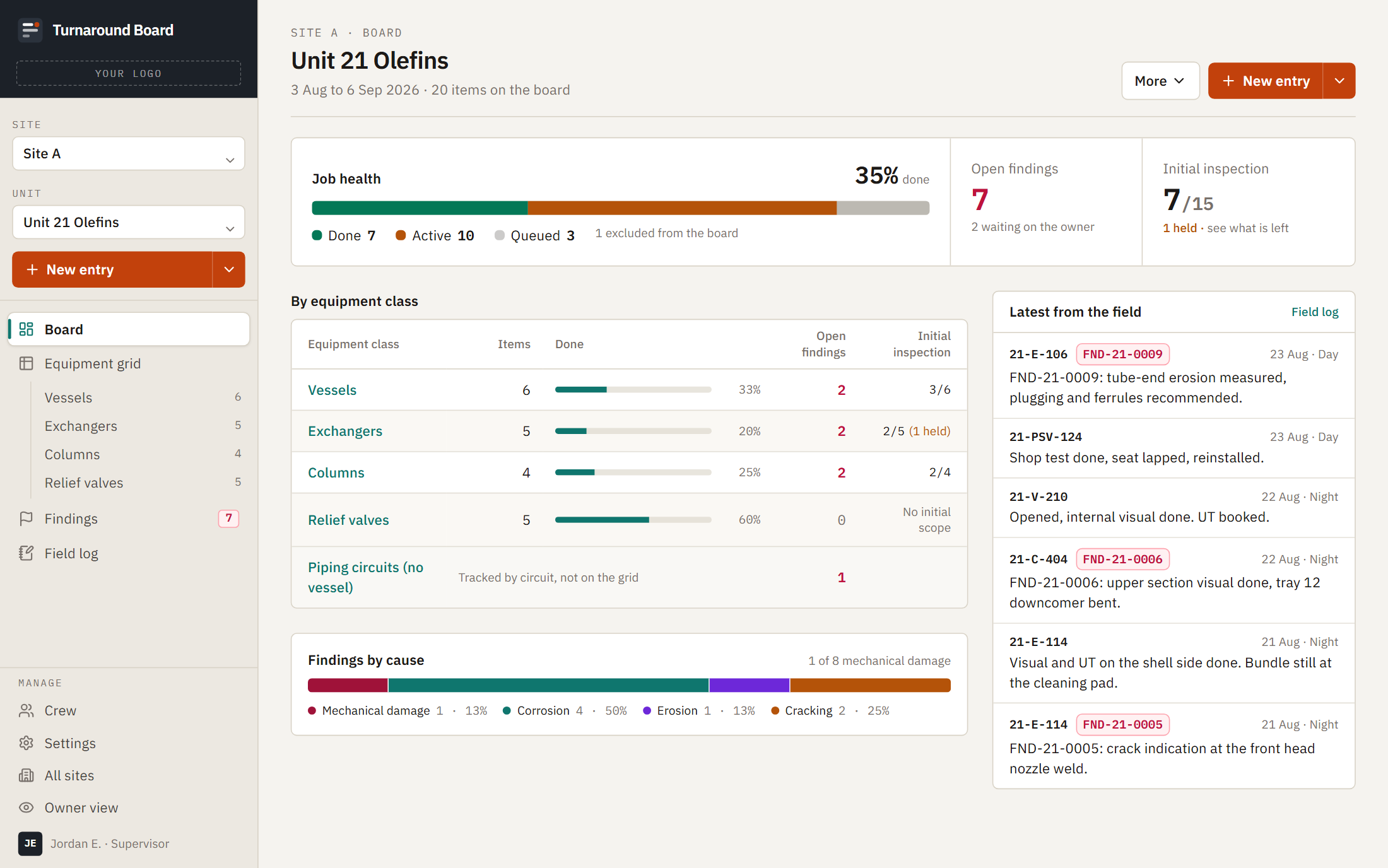
During a turnaround, every inspection step lives on one live equipment grid. One entry from the field updates the chart, the log and the plant's view at the same time.

Client
ReCon Management, Sulphur, Louisiana
Industry
Industrial inspections
What it is
Turnaround wallchart and client portal
Status
Running a live turnaround
1 dayfrom deposit to version one
3,091cells of history loaded on day one
2,328cells on the live turnaround's board
Turnaround wallchart: Plant turnarounds

Try similar software

Software similar to the one we built for ReCon Management, not their exact software. Every customer, job and dollar in it is invented; none of it comes from ReCon Management's data. Your changes stay in your browser.

Full screen ↗
Equipment gridFindingsOwner viewField log
BeforeSulphur, Louisiana

The same status, typed twice.

Inspectors logged their work in one spreadsheet, then typed the same thing into a second. Repair recommendations were Word documents numbered from a third sheet, and the turnaround manager reformatted every one by hand before the plant saw it.

The plant's engineers got each recommendation by email, and their answers were typed back into a list. On a turnaround, falling behind costs a plant hundreds of thousands of dollars.

“Then they got to go back out, go to this other spreadsheet and put the same thing in here to keep everything being updated at the same time.”
B.B., Turnaround Operations Manager, ReCon Management
What we built

One source of truth during the highest-pressure weeks of a plant's year.

Keeps the workbook they know

The import keeps every column of the existing workbook, so nothing about how a turnaround is tracked had to change.

One entry, everywhere

A log entry from the field stamps the equipment grid and the rolling log at once.

Recommendations number themselves

Repair recommendations are numbered automatically, never reused, and print as the formal document with photos.

The plant decides in a portal

The plant approves or defers each recommendation in a read-only portal, so nobody has to call for status.

Discovery and delays tracked

Discovery work and delays are logged against the equipment they hit.

Locked at final QA

Each piece of equipment locks at a final QA sign-off, and the office TV shows the whole board.

“I like the auto population stuff. I like all the customizable, the clickable, you know, makes it quick, easy.”
J.C., Turnaround Inspection Supervisor, ReCon Management

This is what we built for ReCon Management. The demo above is similar software on invented data, not their system.

Step by step

Who does each step, before and now.

StepBeforeNow
Step 1Scope
Before
  • ManagerCopies the same Excel template for each job and types the scope in
Now
  • ManagerBuilds the loader sheet and drags it in
  • AutomaticReads every tab and column, previews the counts and asks before pairing anything uncertain
Step 2Log
Before
  • InspectorLogs the work in one spreadsheet, then types the same thing into a second
Now
  • InspectorMakes one entry from the phone
  • AutomaticStamps the chart cell and writes the log line, turning finished cells green
Step 3Delays
Before
  • InspectorTypes status into the chart and hands off notes in a notebook
Now
  • InspectorLogs a status or a delay
  • AutomaticTracks every delay as active or resolved, with its own report
Step 4Recommendations
Before
  • InspectorTakes the next number from a third sheet and writes a Word report
  • ManagerReformats every report by hand
Now
  • InspectorWrites the finding with photos
  • AutomaticNumbers it, never reuses a number, and builds the formal document
Step 5Plant review
Before
  • ManagerEmails each report to the plant's engineers and types their answers into a list
Now
  • ManagerSends it to the plant or holds it back
  • PlantApproves or defers it in the portal
  • AutomaticUpdates the stage and the log
Step 6Progress
Before
  • PlantReads the live spreadsheet or calls for status
Now
  • AutomaticShows progress in the portal, on the office TV and in the client report
Step 7Close out
Before
  • InspectorMarks final QA in a spreadsheet column
Now
  • InspectorSigns final QA
  • AutomaticLocks the equipment and counts it complete

The software does part of the work at 7 of 7 steps. The turnaround manager still reviews every recommendation before the plant sees it.

Results

Live the day after the deposit, and now running a real turnaround.

Version one went live on July 10, the day after the deposit, loaded with the firm's real history: 110 pieces of equipment, 3,091 cells, 74 past recommendations and 887 log entries.

In October it went live on a real turnaround, with the plant's engineers approving recommendations in the portal. Five days in, the live unit's board carried 348 tagged items and 2,328 cells.

“So far that's all I've seen and everything else is working great, the client said it's a great tool!”
B.B., Turnaround Operations Manager, ReCon Management, by email during the live turnaround
Built with
Is this you?

If your turnaround lives in a workbook and a stack of Word documents.

We'll put the grid, the log, the recommendations and the plant's sign-off on one live record.

More builds

Other systems we've built.

Want one of these for your business?

Start with an AI audit. We'll map which system to build first.