Now booking new clients Lake Charles, Louisiana
Systems

Adopting AI, in four shapes.

For most local businesses, adopting AI lands in one of these four buckets. The audit decides which one moves your business first. They are not products off a shelf, they are built to fit how you already work.

01 · Single source of truth

Custom CRMs.

A CRM is the system your business runs its customers and jobs on. Instead of a generic tool you bend to fit, we build the pipeline, the fields, and the stages around how you sell and deliver, so everything about a customer lives in one place.

What it usually includes
  • A pipeline with the stages your business really uses
  • One customer record: contact, history, jobs, and notes
  • Estimates, work orders, and invoicing tied to each job
  • The repetitive follow-up automated so nothing slips
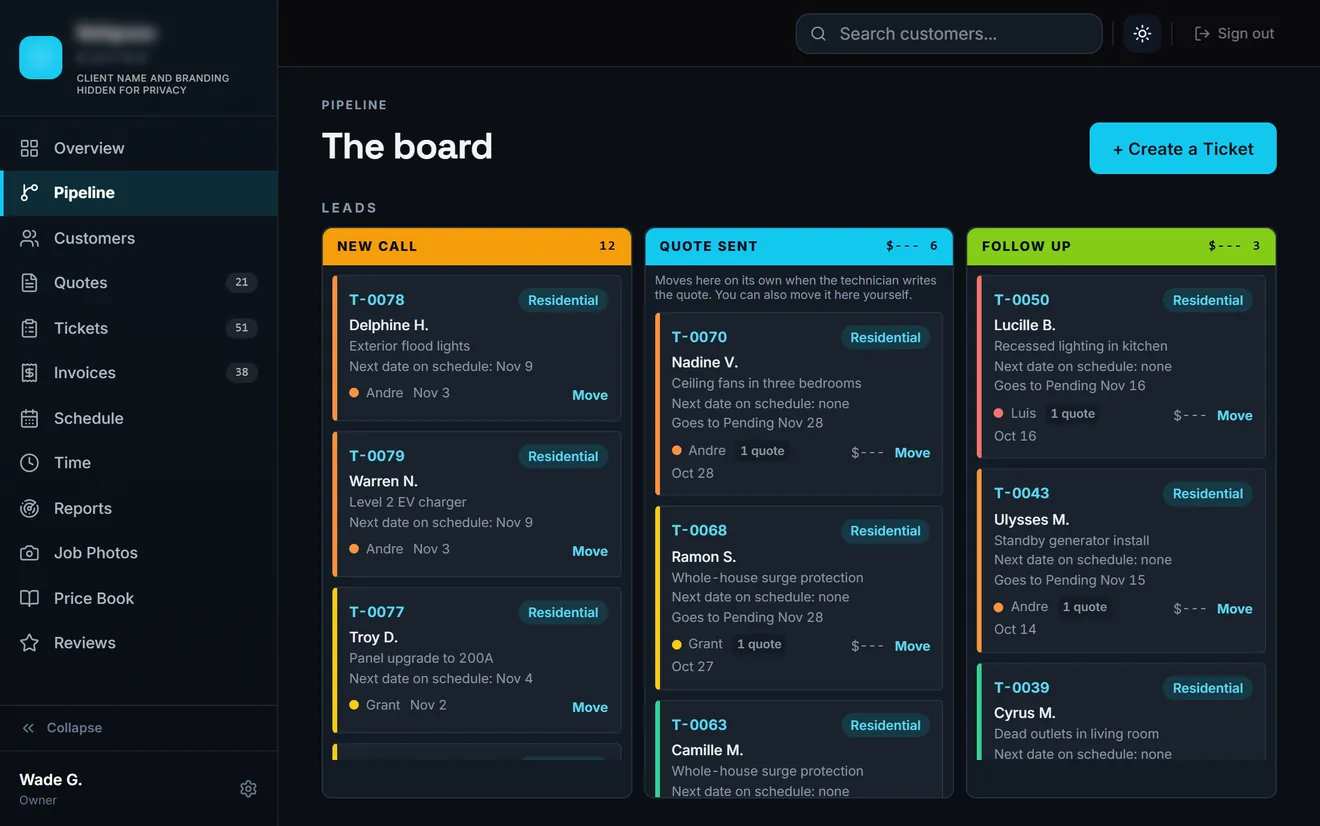
Read the electrical contractor's story →
The ticket pipeline of a field service platform for an electrical contractor, on invented data
The product · Electrical contractor

A field service platform, from the first call to the paid invoice

Software similar to the one we built for Trahan's Electrical. Every name and number in it is invented.

QuotesService ticketsCrew calendarPhoto markup
How it works

One record carries the job from the call to the books.

  1. The callA ticket is created, the customer matched and the lead source tagged.OfficeAutomatic
  2. The quoteBuilt on site from the price book. Prices and descriptions fill in.TechAutomatic
  3. Send and signIt goes out from the owner's own email, and the customer signs on a phone.AutomaticCustomer
  4. The invoiceOne click from the quote. Due dates set themselves, overdue ones get flagged.OfficeAutomatic
  5. CollectingA residential job can't close without a payment or a reason.Automatic
  6. The booksPaid invoices book themselves, checked against the totals first.Automatic
Who does what

Before, the owner did every step by hand.

StepBeforeOwnerNowTeamNow CustomerNow Automatic
The call
The schedule
The quote
Send and sign
The invoice
Collecting
The books

Now software takes part in all seven steps, and two of them run with nobody touching them. The office and the techs still check every quote and invoice before it goes out.

The numbers

The history came across before the crew went live.

Past invoices, on each customer's timeline3,240
Customers2,210
Job photos, 611 of them matched to the right customer automatically796
9.5 weeksfrom signing to the crew going live
17accepted quotes in the first two weeks, 7 signed online
In their words
Everything has been absolutely phenomenal and things are handled quickly and professionally.

Trahan's Electrical
L.T.Owner, Trahan's Electrical
Read how we built it →
The product
02 · One pane of glass

Custom dashboards.

A dashboard pulls every number that matters into one view that updates on its own. No more exporting spreadsheets and stitching them together the night before a meeting. You open one screen and the picture is already there.

What it usually includes
  • An overview tab: revenue, pipeline, and activity at a glance
  • Live pulls from the tools you already use
  • The few numbers you check every day, front and center
  • Quiet flags when something is worth a second look
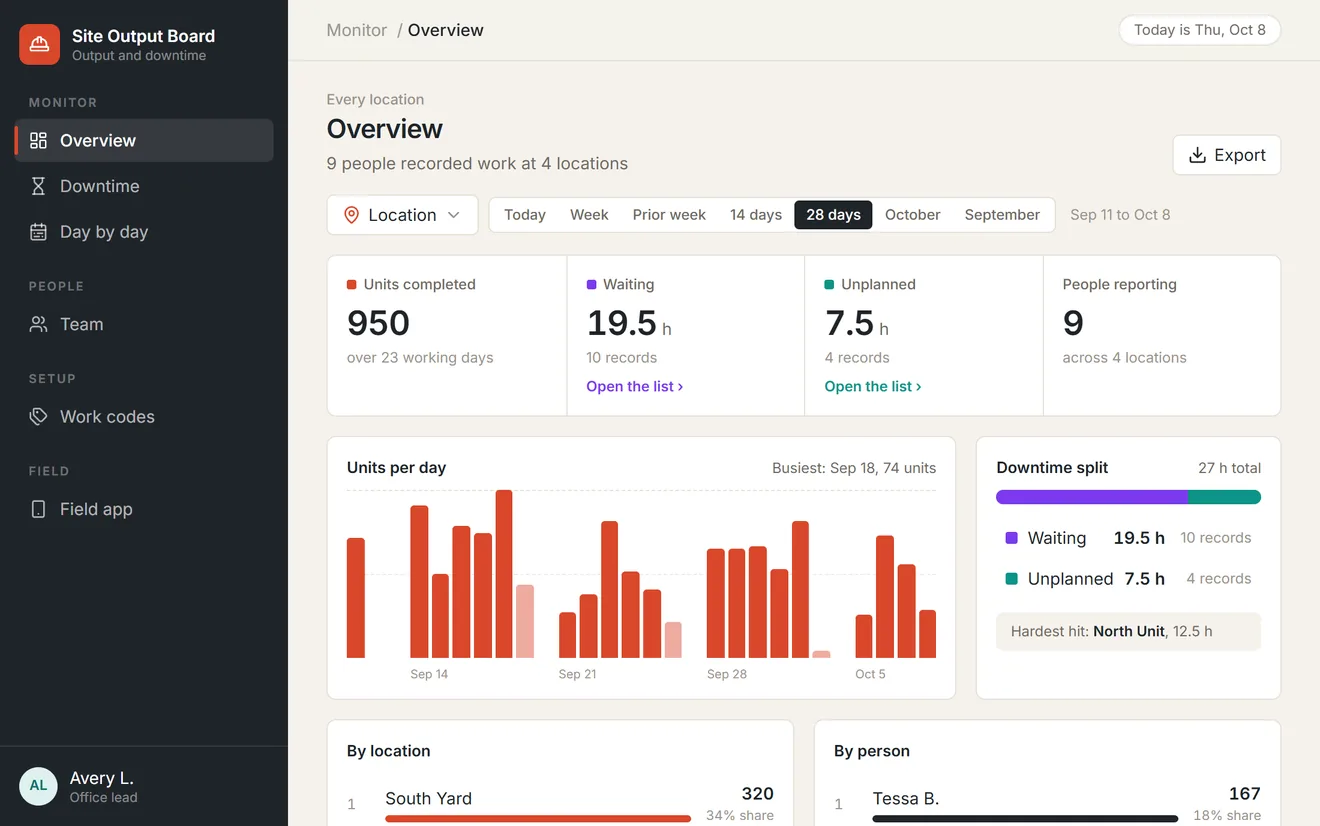
Read the inspection firm's story →
An output dashboard with units per day, downtime and totals by location and by person, on invented data
The product · Industrial inspections

A phone app for the field and a live dashboard for the office

Software similar to the one we built for ReCon Management. Every name and number in it is invented.

Phone PIN appOutput KPIsDowntime reportsCSV export
Before

A new spreadsheet for every site, and nothing rolled up.

Seeing how the work was going meant opening each workbook and adding it up by hand. One site lead often entered production for the whole crew, so nobody could see who did what.

How it works

From a phone in the field to one screen in the office.

In the field
  • Signs in on a phone with a PIN
  • Does the safety check first, where the site requires it
  • Taps in the day's counts
Automatic
  • Stamps the date, site and crew
  • Credits the crew or the person
  • Rolls every site together
In the office
  • A report for each site
  • A calendar and trends
  • PDF and CSV export

An admin can correct an entry before it goes into a report, and the report shows who changed what and when.

The numbers

In the field since June, and taught in-house.

  1. The first field deployment
  2. Two live sites and 15 employees logging on it
  3. Their field services manager ran a lunch-and-learn on it
720units logged in 30 days
15employees logging by August
2live sites by August
In their words
I like the desktop, and I like being able to go in there and I can look at data.
ReCon Management
S.D.Field Services Manager, ReCon Management
Read how we built it →
The product
03 · Quiet background work

Custom automations.

Not everything we build is an app you log into. A lot of it is a process that runs in the background: AI reads the document, writes up the call or drafts the report, and a person checks the parts that matter. We map the jobs costing you the most hours and hand them to a process like that.

A common one: intake automation

When a new lead comes in, software captures it, fills in the missing details, files it where it belongs, and kicks off the first follow-up, all before anyone touches it. No lead falls through, and your team starts every conversation already informed.

See everything we've built →
Benefits brokerage

A carrier's quote, read for you.

Before: every quote meant downloading each carrier's PDF and retyping it into a spreadsheet.

  1. UploadThe broker uploads the signed carrier quote.Broker
  2. ReadIt's read, the plans matched and the rating area worked out.Automatic
  3. CheckThe broker reviews it before anything is created.Broker
  4. EnrollEmployees fill in the broker's form and sign by link.Employee
  5. Set upSensitive fields encrypted, coverage set up, each paycheck deduction worked out.Automatic
Tree service

Every call, summarized and filed.

Before: the owner answered, kept notes, and tracked the lead in a spreadsheet and on paper.

  1. The callA customer calls the office.Customer
  2. RecordedEvery call is recorded.Automatic
  3. SummarizedIt's written up, with the action items pulled out.AI
  4. MatchedThe summary lands on the right customer's record.Automatic
  5. FlaggedNew leads and calls worth a look go to the team chat.Automatic
Tree service

What gets done with nobody touching it.

  1. Invoices and payments sync to the books
  2. Each foreman gets the day's jobs
  3. The work order and the deposit invoice build themselves
  4. A draft invoice is waiting for the office to review

A person still reviews every estimate and invoice before it reaches a customer.

Tree service · the result

Paperwork per customer, from estimate to invoice.

Before
about 4 hours
Now
about 20 minutes

By the owner's own count.

95invoices synced to the books by early October, with nobody retyping them
3,083records moved off the old invoicing app, none failed
Monthly data report

A report that writes and checks itself.

  1. Every dayNew job posts are collected.Automatic
  2. The 1stThe month's numbers are run and the data is checked.Automatic
  3. DraftingBoth reports are drafted.AI
  4. Claim checkEvery claim is checked against the numbers. One that doesn't match blocks the publish.Automatic
  5. ShareA person reviews the community post and puts it up.Person

The claim check caught 6 of 6 planted errors in testing. The report covers more than 70,000 job posts.

In their words
Hey, Nick. I hope you know that I'm extremely satisfied.
B.L.Owner, Marshland Partners
Read how we built it →
Reading a quote
04 · Built to fit

Internal tools.

Internal tools are the day-to-day software your team opens to get work done: scheduling, inventory, job tracking, field and inspection apps. When the off-the-shelf option does not fit your workflow, we build the one that does.

A common one: scheduling & dispatch

A tool that puts the right person on the right job at the right time. Jobs, crews, and calendars in one place, so dispatching stops living in someone's head and on a whiteboard.

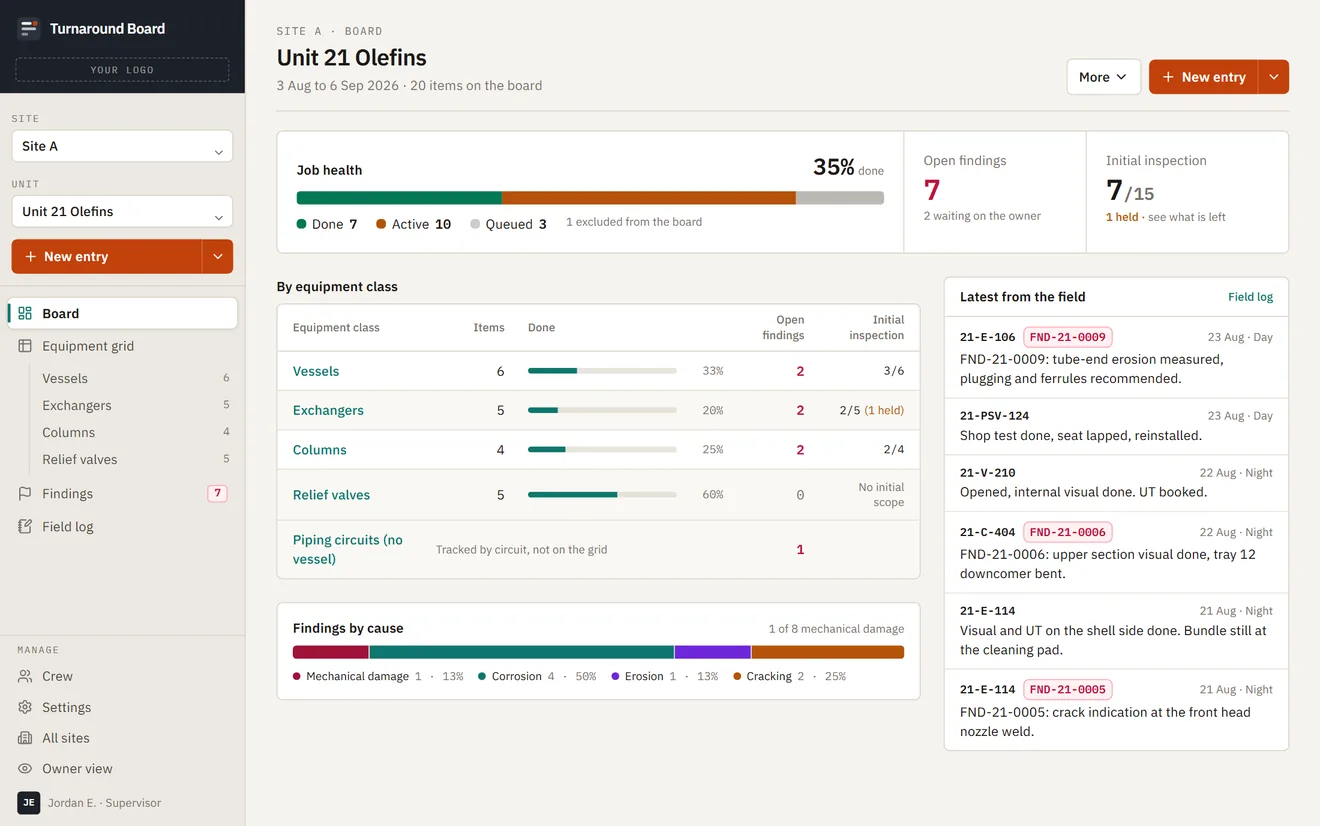
Read the turnaround story →
A turnaround board with job health, findings by cause and the latest entries from the field, on invented data
The product · Plant turnarounds

A digital wallchart for the busiest weeks of a plant's year

Software similar to the one we built for ReCon Management. Every name and number in it is invented.

Equipment gridFindingsOwner viewField log
How it works

One entry from the field updates everything.

From the fieldAn inspector makes one entry on a phone
  • The equipment gridThe cell is stamped. Finished ones turn green.
  • The field logThe log line writes itself.
  • The plant's portalProgress shows up for the plant.
  • The office TVThe whole board, live.

Before: inspectors logged the work in one spreadsheet, then typed the same thing into a second.

How it works

Repair recommendations, without the paperwork.

  1. The findingThe inspector writes it up with photos.Inspector
  2. The paperworkIt's numbered, never reusing a number, and built into the formal document.Automatic
  3. The sendThe manager sends it to the plant or holds it back.Manager
  4. The decisionThe plant approves or defers it in its portal.Plant
  5. The recordThe stage and the log update.Automatic

Before: each one took the next number from a third spreadsheet, became a Word report, and was reformatted by hand.

The numbers

Live the day after the deposit.

Loaded on day one
Cells of history on the chart3,091
Log entries887
Pieces of equipment110
Past recommendations74
Five days into a live turnaround
Cells on the live unit's board2,328
Tagged items348
In their words
I like it. I like it a lot. And I think everybody else is going to like it too.
ReCon Management
J.C.Turnaround Inspection Supervisor, ReCon Management
Read how we built it →
The product

Which one moves your business?

That is exactly what the AI audit answers. Start there and we will find your first build.

Book your AI audit →